• Home
  • About Us
  • Contact
  • Linking Policy
  • Privacy Policy

Grafic Ho

Personal Graphics Blog

Adobe Stock Tips: How to Change your Background Photo using Adobe App

January 17, 2017 By Joseph

Hello there! Are you using Adobe applications for your creative projects? If you are, then you are in for a treat. With the launching of Adobe’s newest stock photo service, photo-editing just got better, easier and faster. Today, we will help you change your background photo using Adobe Stock and the Adobe application. The brand new Adobe Stock service is available to Creative Cloud members and is integrated into the Creative Cloud 2015 applications.
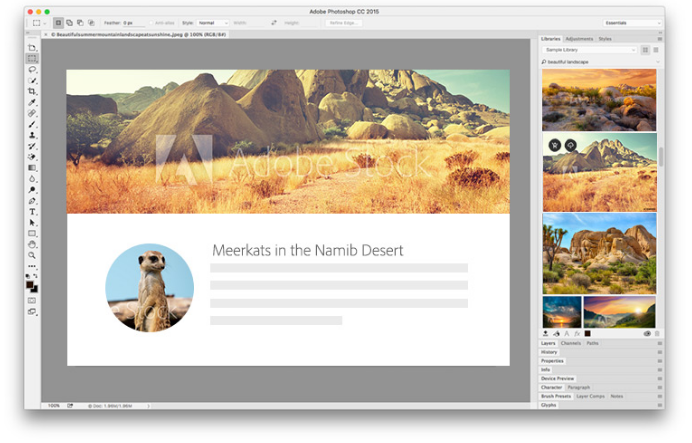
Are you ready to change your background photo? Okay, first, take a picture you really like and open it with your Adobe photo-editing application. To put a stock background or change the stock background, go to your Creative Cloud library panel located at the right side of the application. From there, you will see the brand new Adobe Stock icon at the bottom of all the applications and the library panels. Then, observe the following tips to start changing your background photo.

  • Click the Adobe Stock icon and it will take you to the Adobe Stock website. From there, you can do a search for whatever you want as your background photo.
  • For instance, you want to find a background on fashion. Type the phrase “fashion background” and choose among just photos, just vectors, just illustrations, or all three of them. Then, go ahead and do the search by clicking “Go” or “Enter”.
  • The website will just start showing the images. Scroll through until you find an image you are interested with. Once you find one that you really like, click on it and see it in more detail. You will also see some images that you might like.
  • If you are not quite sure what it’s going to look behind your photo, you do not have to buy it yet – which is the best part. You do not have to download the image or pay $10 for it. You can download a preview of it and save it to any of your current libraries.
  • Once you do that, the image will be saved and you can head back to your Photoshop application. You will see the image there, ready to use.
  • Now, what is the difference between the preview image and the one you will purchase? The preview image has low resolution and watermark.
  • To change the background, drag the image, place it anywhere you want and scale it. Move the image behind the photo and move the crop tool to see the image in the original. You can also add some shadows if you like.

If you are already happy with the image and you want to keep it, head back to your library, right click the photo and choose license this image. You can also head back to the website and license the image. It will automatically sync in the high-res and replace it for you.


Filed Under: Adobe Stock Tagged With: adobe stock, logo, photos

Recent Posts

  • Best Stock Photos for Google Ads Display Creatives
  • 10 Best Stock Photos Websites for High-Quality Images
  • How to Take Professional Headshots: A Complete Guide for Perfect Business Portraits
  • 10 Essential Graphic Design Tips: A Complete Beginner’s Guide to Creating Amazing Designs
  • What Can You Get with a Getty Promo Code?
  • Adobe Stock Tips: How to Change your Background Photo using Adobe App
  • 6 Common Restrictions in Using Royalty Free Images
  • iStock Credit Compared to Shutterstock
  • If You Want 15% Off of Your Subscription Price, be Sure to Use the iStockphoto Promo Code
  • 5 Do’s in Using Cheap Stock Photos in Your Marketing
  • Searching for Files with an iStock Promo Code
  • Don’t Use Adobe Stock Photos for Your Logo
  • 3 Key Features of Adobe Stock

Features of Adobe Stock

Our Blogs

Creating high-performing Google Ads display creatives requires more than compelling copy and strategic targeting. Visual elements—especially stock photos—play a decisive role in capturing attention, communicating value, and driving clicks. Choosing the right stock images can significantly improve ad performance, increase engagement, and enhance brand perception. The Role of Visuals in Display Advertising Display ads are […]

Discover how stock photos can elevate your online content without breaking the bank. Learn about licensing options, top free and premium platforms, and expert tips for selecting images that enhance your brand identity. Transform generic visuals into unique assets with our guide to using stock photography effectively.

Learn essential techniques for capturing professional headshots that make a lasting impression. From lighting and camera settings to posing tips and post-processing, discover how to create stunning portraits that convey confidence and authenticity in your professional image.

Featured Graphics of the Month

Tags

20 percent off adobe stock cheap stock photos features getty images getty images coupon getty images promo code istock istock credits istockl istock photo istockphoto istock prices istock pricing istock promo istock promo code istock promo code 2015 logo marketing photos Royalty Free Images Royalty Free photos Royalty Free Stock images using stock photos using the cheap stock photos

Copyright © 2026 · AgentPress Pro Theme On Genesis Framework · WordPress · Log in